
Agile Defense · Deep dive
From a one-person process to a shared toolkit.
A reusable Figma system helped a four-person team produce training graphics together.
Results
3 in 3 days
Course modules, up from 1 in 2 weeks
~½ day
To set up the system framework
2 days
Ahead of schedule
Observed on this course. These are project results, not a sustained production rate.
Every graphic depended on one person.
I manage the effort to build a program management training course for government contracts. The graphic designer on our team of four drew every graphic for the videos in Adobe Illustrator. Graphics are that designer’s specialty, and one finished module still took two weeks.
With one person on every graphic, progress stopped whenever they got pulled onto something else.
- Scope
- 11 modules of about 10 minutes each
- Deadline
- Due by the end of 2026
- Starting rate
- One finished module in two weeks
- Pressure
- Behind on a strict deadline, with pressure from leadership
Make scene production a shared task.
I manage the course effort and review its scripts. I helped create the production process, ran the discovery and outline workshops, and set up the Figma design system with scene templates.
How the course gets made
Scripts come first, reviewed by subject matter experts throughout, because the team wasn’t expert in program management. Storyboards follow. Between storyboards and production, AI makes quick sketches of each scene, and the team builds the icons and assets that go into HeyGen for the video.
- ScriptsReviewed by subject matter experts throughout
- StoryboardsFollow the scripts
- Scene sketchesQuick sketches made with AI
- The step that changedIcons and assetsBuilt in the Figma design system
- VideoAssembled in HeyGen
Use the tool the team already knew.
Build it in Figma
WhyThe team already knew it and liked working in it, so anyone could jump in.
Make scene templates drag and drop
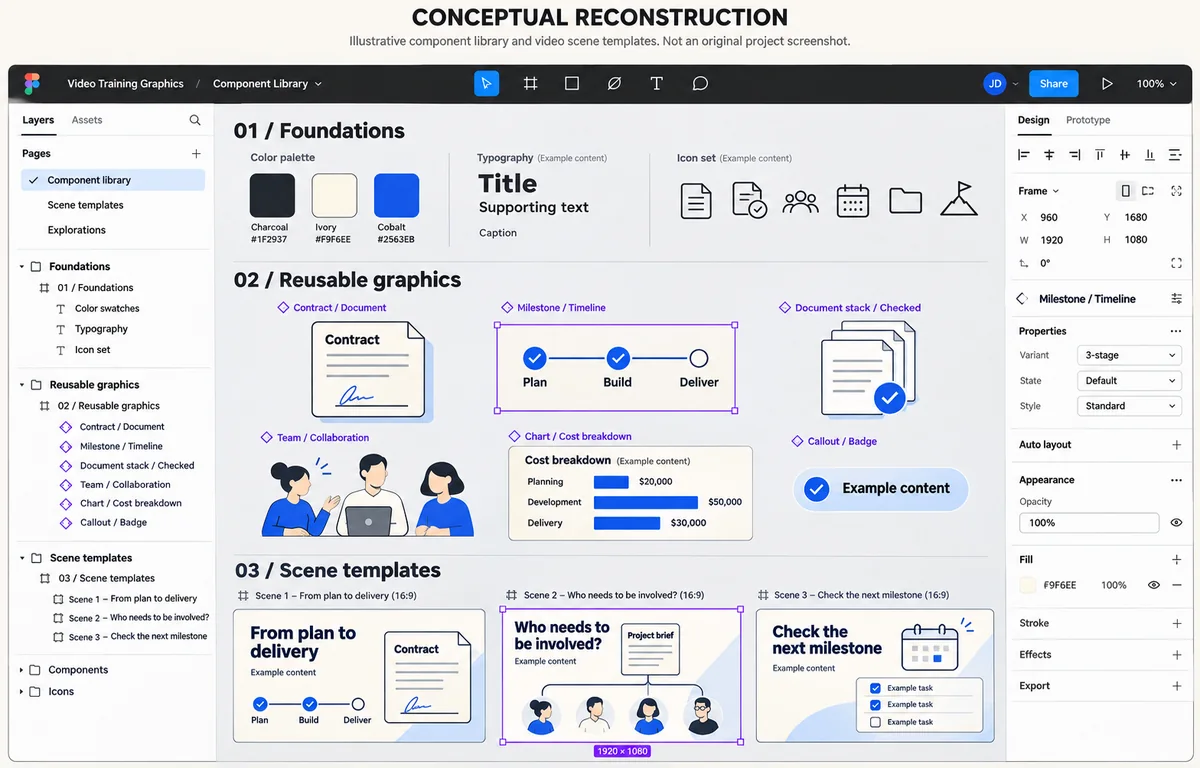
WhyEach scene template is a visual version of a script section, made mostly of text and icons, so every on-screen asset became a drag-and-drop piece.
Build it from components and variables
HowThe system follows atomic design principles and uses Figma components and variables.
Keep everything in one shared file
WhyAnyone could see where everyone else was and pick up work as they had time. Setting up the framework took about half a day.
One specialist, one graphic at a time
Several contributors, one shared library
Illustrative reconstruction of how the work was organized: one specialist making each graphic in turn, then several contributors building scenes from a shared library of components. No course content.
Three modules in three days.
After the change, the team finished three modules in three days, up from one module in two weeks, and ended two days ahead of schedule. The course is still in production.